Text message alerts
How agency staff opt in to text messages from Actme Evidence Retention, what those messages say, and how to stop them.
- Last updated:
- Full terms:
- Terms & Conditions §4
1. The program at a glance
- Who sends
- Actme Software, LLC, through the Actme Evidence Retention software installed at a customer agency.
- Who receives
- Sworn and civilian staff at that agency who hold an account in the software and have opted in themselves. Never the general public.
- Message type
- Transactional operational alerts about the recipient's own work: the status of a video export they requested, or a system condition that needs attention. No marketing message is ever sent through this program, and there is no path in the software to send one.
- Frequency
- Varies with the recipient's own activity — typically one message per export job they ran. There is no scheduled or recurring send, and no campaign blast.
- Cost
- Message and data rates may apply. Carrier charges are between the recipient and their carrier.
- Opt out
- Reply STOP to any message, or clear the consent checkbox in the software. Reply HELP for help.
2. How someone opts in
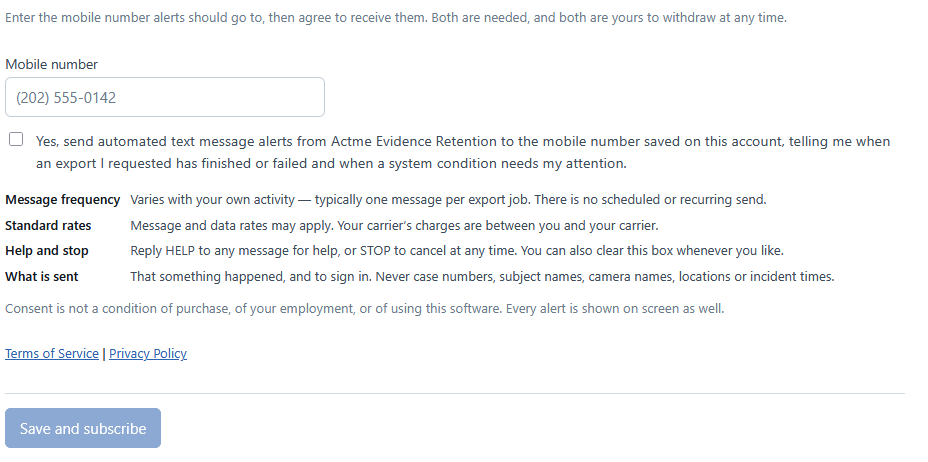
Actme Evidence Retention is installed on servers the customer agency owns and runs, behind that agency's own sign-in. There is no public sign-up form, because there is no public audience: the only people who can opt in are staff who already hold an account. The screenshots below are of the actual opt-in screen, shown with a demonstration account.
Step 1 — Add a mobile number and agree to alerts
On their own profile page, signed in as themselves. The mobile number and the consent checkbox sit in the same panel, with the full disclosure — message frequency, standard rates, help and stop, and what is sent — shown on screen beside the box, not behind a link. The box is never pre-checked. It is stored as off for every new account, the only thing that can turn it on is the account holder clicking it, and no administrator, installer or support process can set it for somebody else.
Step 2 — A confirmation text is sent immediately
Saving sends this text right away. There is no code and nothing to type back in — the message itself is the confirmation. If the number cannot receive text messages, the confirmation fails to deliver rather than the account holder having to prove anything. Withdrawing consent later sends its own one-time confirmation the same way, so turning the program off is confirmed exactly as clearly as turning it on.
-
Sent once, right after saving
Actme.ER: You are now subscribed to text alerts. Reply HELP for help, STOP to opt out. Msg & data rates may apply.
-
Sent once, right after withdrawing consent
Actme.ER: You are unsubscribed from text alerts. Turn them back on any time in your profile. Reply HELP for help. Msg & data rates may apply.
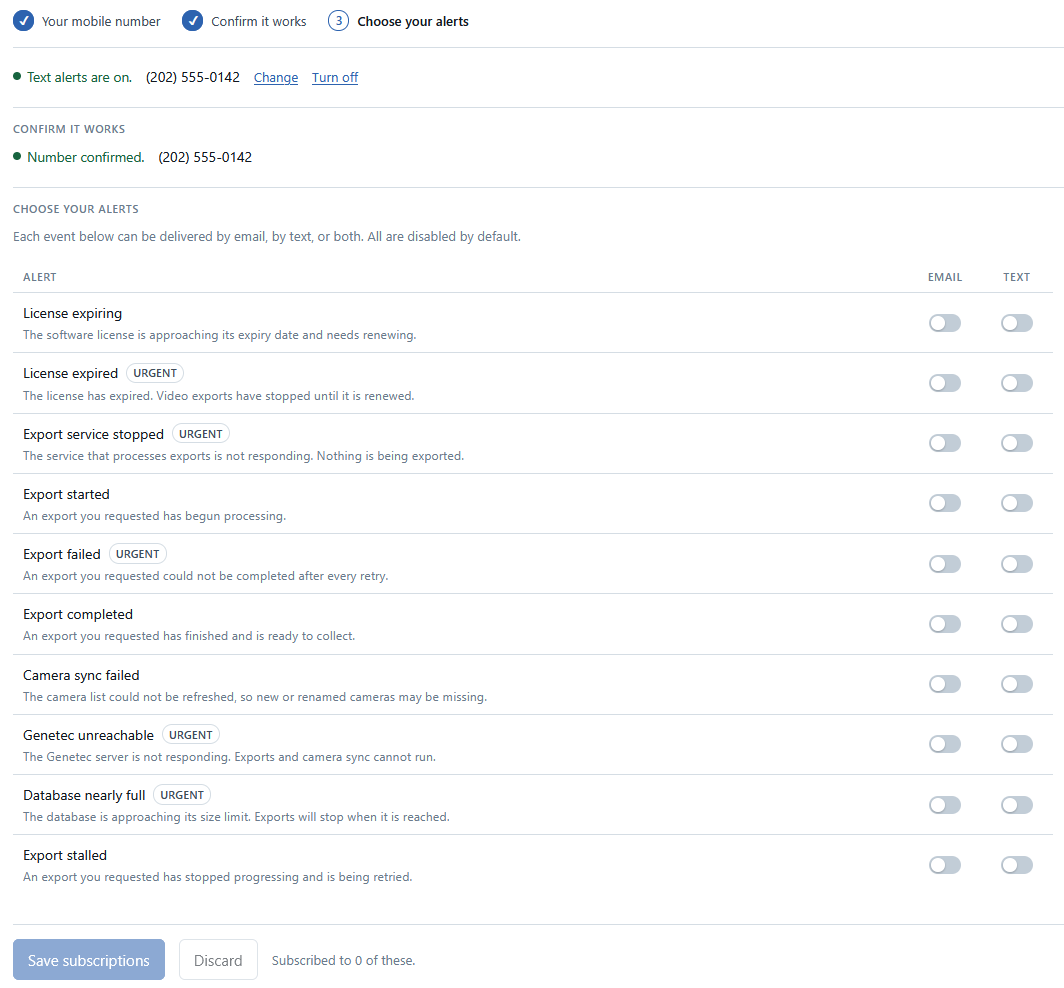
Step 3 — Choose which alerts to receive by text
Consent in step 1 is the master switch; it does not by itself turn any alert on. Each alert type — an export finishing or failing, a system condition needing attention, and so on — can be delivered by email, by text, or both, and every one is off by default. Withdrawing consent clears every text option underneath it.
Consent is not a condition of anything. It is not required to buy any product, it is not a condition of employment, and it is not required to use the software. Every alert that can be sent as a text is also shown on screen inside the application, which remains the authoritative record.
3. Sample messages
Every message identifies the program, and any message can be answered with HELP or STOP at any time — the carrier honors both on every incoming text, whichever program message prompted the reply. The two confirmation texts below spell that out directly, since they are the moments the opt-in relationship itself is created or ended; the alerts about an export or a system condition do not repeat it every time. The content is deliberately thin — that something happened, and an instruction to sign in. No case numbers, subject names, camera names, locations or incident times ever appear in a text message, because text messaging carries no confidentiality guarantee and these alerts concern criminal evidence.
Messages we send
-
An export the recipient requested has started
Actme.ER: Your video export has started. Sign in to check on it.
-
An export the recipient requested has finished
Actme.ER: Your video export has finished. Sign in to view results.
-
An export the recipient requested did not complete
Actme.ER: Your video export did not complete. Sign in for details.
-
An export finished, but some cameras in it failed
Actme.ER: Your export finished with some issues. Sign in for details.
-
A system condition needs attention
Actme.ER: A system condition needs attention. Sign in for details.
Replies to keywords
-
Reply HELP
Actme.ER alerts: Notices that your video export finished or failed. Help: support@actmesoftware.com. Reply STOP to opt out. Msg & data rates may apply.
-
Reply STOP
Actme.ER alerts: You are unsubscribed and will get no more messages. Reply START to resume. Help: support@actmesoftware.com
We do not operate a telephone support line, so the HELP reply gives an address that is actually monitored rather than a number that rings nowhere.
4. How someone stops the messages
There are three ways, and any one of them is enough.
- Reply STOP to any message. One confirmation follows and then nothing further. Reply START or UNSTOP to resume.
- Clear the checkbox in the profile page shown above, or remove the mobile number, which withdraws the consent with it.
- Ask the agency's own system administrator, who can turn the notifications off for an account.
5. What happens to the number
Mobile numbers are held in the customer agency's own database, on the agency's own servers. We do not sell, rent, trade, or share mobile numbers or SMS consent with third parties or affiliates for marketing or promotional purposes. The full statement is in the Privacy Policy and in §4 of the Terms, which govern the program.
6. Contact
Actme Software, LLC785 Revival Row, Fort Mill, SC 29708
support@actmesoftware.com · https://actmesoftware.zendesk.com